
Carbon vs. Oxide (uMod): Which Framework Should You Run in 2026
Carbon vs. Oxide (uMod): Which Framework Should You Run in 2026?
By VYKIX Team | Updated: January 2026
For nearly a decade, if you wanted to run a modded Rust server, you had one option: Oxide (uMod). It was the industry standard, the backbone of the community, and the only game in town.
But the landscape has shifted.
Over the last two years, Carbon has surged from an experimental alternative to a powerhouse framework, challenging the status quo with promises of higher FPS, better tools, and modernized code.
As a server owner in 2026, you have a decision to make. Do you stick with the tried-and-true legacy of Oxide, or do you switch to the high-performance architecture of Carbon?
At VYKIX, we support both—but the metrics are painting a clear picture. Here is the definitive showdown.
The 30-Second Verdict (TL;DR)
- Choose Oxide if you are running a legacy server with ancient, private plugins that haven’t been updated in 5+ years, or if you prefer the “traditional” chat-command workflow.
- Choose Carbon if you want faster boot times, reduced server lag (higher FPS), an in-game admin UI, and automatic updates.
- Our Pick for 2026: Carbon. It is fully backward compatible with Oxide plugins and offers superior performance.
The Core Difference: Architecture & Speed
The biggest complaint Rust server owners have is performance. As Rust adds more content (industrial updates, new monuments, vehicles), the strain on your server RAM and CPU increases.
Oxide: The Heavy Lifter
Oxide works by patching the game’s DLLs extensively. While robust, this “heavy” approach can sometimes lead to slower server startup times and “garbage collection” spikes that players feel as rubber-banding.
Carbon: The Surgical Tool
Carbon uses a modern technique called Dynamic Hooking. Instead of loading everything at once, Carbon hooks into the game code more intelligently and efficiently.
- Result: In our benchmarks, Carbon servers often boot 30-40% faster than equivalent Oxide servers.
- Stability: Carbon’s codebase is optimized for modern hardware, often resulting in higher stable FPS during high-pop scenarios (200+ players).
Feature Showdown: Quality of Life for Admins
This is where Carbon truly separates itself from the pack.
1. The In-Game UI vs. Chat Commands
- Oxide: Managing plugins usually requires typing chat commands like
/o.grant group admin...or editing JSON config files via FTP, restarting the server, and hoping you didn’t miss a comma. - Carbon: Press F1 and type
carbon. A full visual GUI opens inside the game. You can enable/disable plugins, change permissions, and edit configurations instantly without leaving the server.
2. The “Wipe Day” Headache
On forced wipe days, Oxide users are often stuck waiting for the developers to release a patch. If Oxide is down, your server is down.
Carbon features automatic hooking updates. In many cases, Carbon can update itself to match the new Rust version immediately, meaning your server is back online hours before your competitors.
3. Built-in Modules
Carbon comes with essential tools pre-installed that you would usually need to download separately for Oxide:
- Discord Link: Built-in.
- Stack Manager: Built-in.
- Gather Manager: Built-in.
This reduces the number of .cs files your server has to load, further improving performance.
The Big Fear: “Will My Plugins Break?”
This is the #1 reason admins hesitate to switch. You have spent years curating your plugins folder.
The good news: Carbon is designed with a Compatibility Layer.
It effectively “tricks” plugins into thinking they are running on Oxide. If you have a standard .cs plugin from Codefling, ChaosCode, or uMod, it will almost certainly run on Carbon without a single edit.
In 2026, we are essentially seeing near-100% parity. In fact, many developers are now releasing “Carbon Only” versions of their plugins to take advantage of the advanced features.
How to Switch (The Easy Way)
If you are hosting on a generic VPS, switching frameworks is a pain. You have to manually delete DLLs, upload new compiler files, and risk file corruption.
At VYKIX, we solved this.
We believe you shouldn’t need a degree in computer science to host a game server.
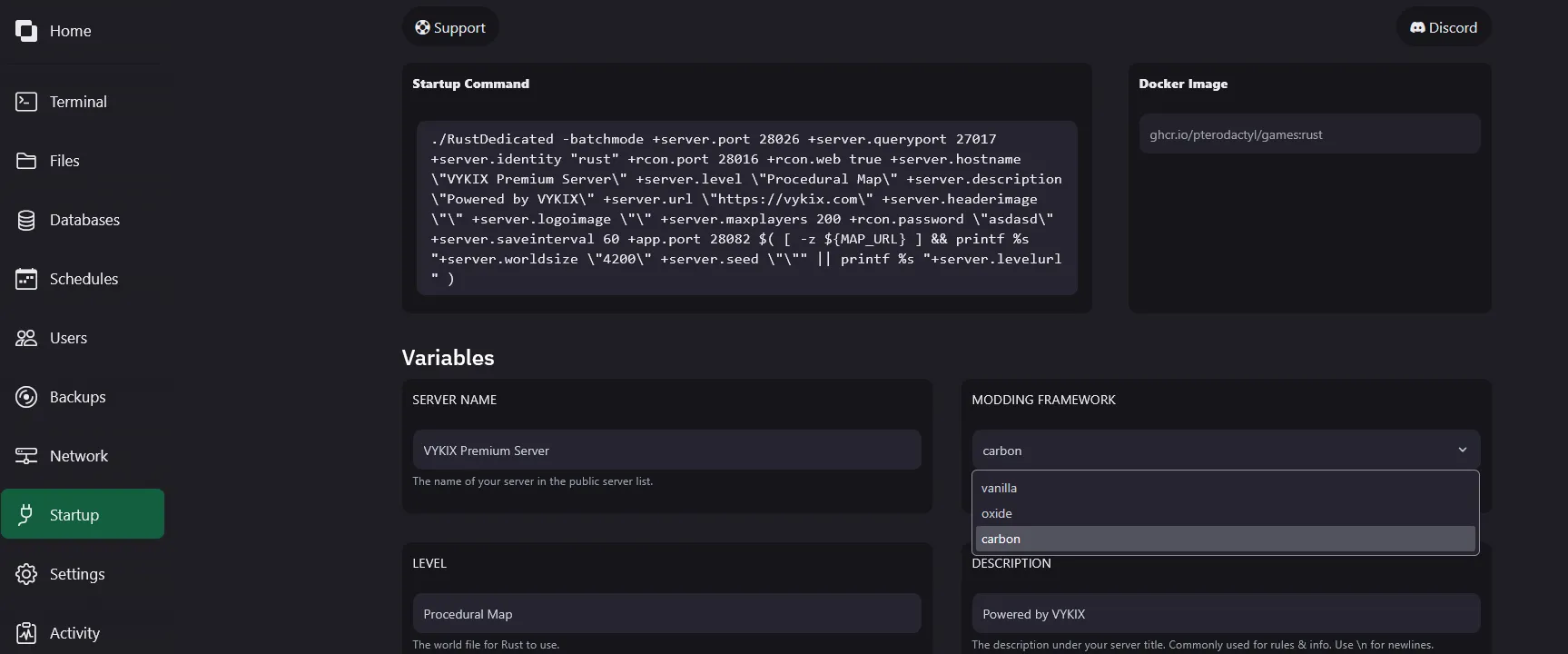
- Go to your Game Panel.
- Navigate to the “Mod Manager” or “Startup” tab.
- Toggle the switch from Oxide to Carbon.
- Restart.
That’s it. Our system handles the file replacement automatically, preserving your oxide/config and oxide/data folders so you don’t lose your settings.
Final Verdict: Which One Do You Need?
The era of Oxide’s monopoly is over. While we have immense respect for the uMod team and what they built, Carbon is the superior choice for modern Rust hosting.
It is lighter, faster, and easier to manage. If you are starting a new server in 2026, or if you are tired of lag spikes on your current server, the answer is Carbon.
Ready to deploy?
Don’t settle for laggy hardware. Deploy a Carbon-optimized Rust server with VYKIX today and experience the difference high-clock speed CPUs make.
View Rust Server Plans & Pricing
Frequently Asked Questions
Q: Can I use the same plugins on Carbon that I used on Oxide?
A: Yes. Carbon features a robust backward-compatibility layer. 99% of Oxide plugins work out-of-the-box on Carbon.
Q: Is Carbon free?
A: Yes, the Carbon framework is free and open source, just like Oxide.
Q: Does Carbon reduce server lag?
A: Generally, yes. Carbon’s optimized hook system and lighter footprint often result in higher server FPS and lower RAM usage compared to Oxide.